Ubuntu による Nexus7 文鎮化からの復旧
またもや Nexus7 が文鎮化してしまいました。
起動時に、くるくるのアニメーションから、まったく先に進まなくなり起動しなくなってしまいました。
前回と全く同じ状況です。
Nexus7 文鎮からのリカバリ成功 - moremagicの日記
前回と同じように復旧を試みようと思いましたが
現在の開発環境から あいにくすべて消去 してしまっています。
もう一度入れるか・・・ とも思いましたが
この際 Andorind 開発環境を VirtualBox上の 仮想OS に作ってみることにしました。
そうすれば次回何か起きてもすぐに環境作れるしね!
■環境情報
Host;Windows7 pro
VirtualBox 5.0.14
Guest;Ubuntu 15.10 Desktop 64bit
■HostOS側の準備
以下の記事を参考に VirtualBox Extension Pack をインストールします
https://www.virtualbox.org/wiki/Downloads
http://download.virtualbox.org/virtualbox/5.0.14/Oracle_VM_VirtualBox_Extension_Pack-5.0.14-105127.vbox-extpack
■USB接続のための設定
文鎮化しちゃった Nexus7 をホストOSに接続。
USB 接続設定をGuestOS側にしてあげます。
なお、通常状態で接続してからの設定と
ファーストブートモードにしてから接続し設定という2回の設定が必要ですので注意。
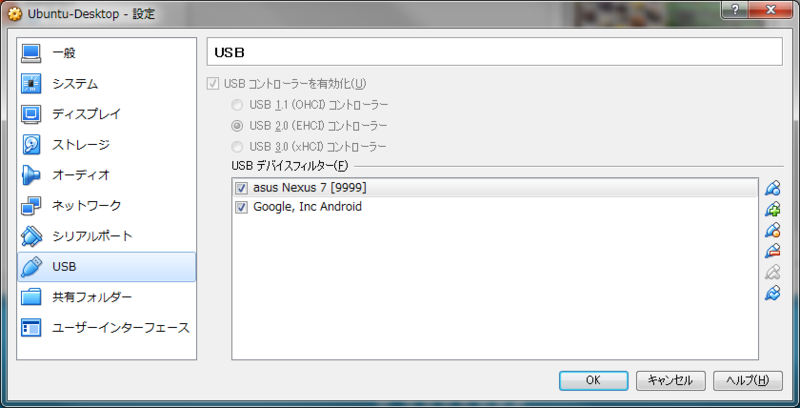
通常状態で接続した場合 以下のように出てくれば成功
$ lsusb
Bus 001 Device 002: ID 18d1:4e41 Google Inc. Nexus 7 (MTP)
Bus 001 Device 001: ID 1d6b:0002 Linux Foundation 2.0 root hub
Bus 002 Device 002: ID 80ee:0021 VirtualBox USB Tablet
Bus 002 Device 001: ID 1d6b:0001 Linux Foundation 1.1 root hub
ファーストブートモードのときは
ファーストブートモードにしてからUSB接続。その後 VirtualboxでUSB設定をします。
GuestOS側でFIRSTBOOTモードでUSBドライバを認識させる方法
http://momoto.github.io/blog/2012/08/02/set-up-udev-rules-to-detect-android-device/
http://developer.android.com/tools/device.html
# vi /etc/udev/rules.d/51-android.rules
----
   SUBSYSTEM=="usb", ATTR{idVendor}=="18d1", MODE="0666", GROUP="plugdev"
   ※ ベンダーコードを lsusb で調べた結果の Google に。

# chmod a+r /etc/udev/rules.d/51-android.rules
以下のように表示されれば成功です。
$ lsusb
Bus 001 Device 002: ID 18d1:4e40 Google Inc. Nexus 7 (fastboot)
Bus 001 Device 001: ID 1d6b:0002 Linux Foundation 2.0 root hub
Bus 002 Device 002: ID 80ee:0021 VirtualBox USB Tablet
Bus 002 Device 001: ID 1d6b:0001 Linux Foundation 1.1 root hub
■GuestOS側準備
Java のインストールは割愛。
$ java -version
java version "1.8.0_66"
Java(TM) SE Runtime Environment (build 1.8.0_66-b17)
Java HotSpot(TM) 64-Bit Server VM (build 25.66-b17, mixed mode)
$ sudo wget http://dl.google.com/android/android-sdk_r24.4.1-linux.tgz
$ sudo tar xvzf android-sdk_r24.4.1-linux.tgz
$ cd android-sdk-linux/
$ echo 'export PATH=$PATH:/opt/android-sdk-linux/tools:/opt/android-sdk-linux/platform-tools' >> ~/.bashrc
source ~/.bashrc
■ファクトリイメージの復元
以下の資料を参考に 5.1.1 (LMY47V)インストールをします。
http://mariyudu.hatenablog.com/entry/2015/09/07/215045
https://developers.google.com/android/nexus/images#nakasi
$ mkdir work
$ cd work
$ wget https://dl.google.com/dl/android/aosp/nakasi-lmy47v-factory-b48bd71d.tgz
$ tar xvzf nakasi-lmy47v-factory-b48bd71d.tgz
$ vi nakasi-lmy47v/flash-all.sh
  ----
  fastboot -w update image-nakasi-lmy47v.zip
         ↓
  fastboot update image-nakasi-lmy47v.zip // -w オプションを削除する

$ ~/work/nakasi-lmy47v$ ./flash-all.sh
  ...
  (bootloader) Bootloader is already unlocked
  OKAY [  0.047s]
  finished. total time: 0.047s
  erasing 'boot'...
  OKAY [  0.086s]
  finished. total time: 0.086s
  ******** Did you mean to fastboot format this partition?
  erasing 'cache'...
  OKAY [  0.143s]
  finished. total time: 0.143s
  erasing 'recovery'...
  OKAY [  0.027s]
  finished. total time: 0.027s
  ******** Did you mean to fastboot format this partition?
  erasing 'system'...
  OKAY [  0.610s]
  finished. total time: 0.610s
  ******** Did you mean to fastboot format this partition?
  erasing 'userdata'...
  OKAY [ 10.485s]
  finished. total time: 10.485s
  sending 'bootloader' (2100 KB)...
  OKAY [  0.456s]
  writing 'bootloader'...
  OKAY [  2.074s]
  finished. total time: 2.531s
  rebooting into bootloader...
  OKAY [  0.018s]
  finished. total time: 0.886s
  archive does not contain 'boot.sig'
  archive does not contain 'recovery.sig'
  archive does not contain 'system.sig'
  archive does not contain 'vendor.img'
  --------------------------------------------
  Bootloader Version...: 4.23
  Baseband Version.....: N/A
  Serial Number........: 015d3b65f4401204
  --------------------------------------------
  checking product...
  OKAY [  0.030s]
  checking version-bootloader...
  OKAY [  0.020s]
  sending 'boot' (5184 KB)...
  OKAY [  1.115s]
  writing 'boot'...
  OKAY [  0.219s]
  sending 'recovery' (5738 KB)...
  OKAY [  1.241s]
  writing 'recovery'...
  OKAY [  0.239s]
  erasing 'system'...
  OKAY [  0.116s]
  sending 'system' (649455 KB)...
  OKAY [155.387s]
  writing 'system'...
  OKAY [ 36.100s]
  rebooting...

  finished. total time: 195.452s
成功!
それにしても Nexus7 はよく文鎮化するなぁ。。。
